Status at a glance
The project dashboard shows the status breakdown across the whole register: how many requirements are compliant, partially compliant, non-compliant and still to be determined, with the same breakdown for closure and for acceptance. Beneath it the status map lays every system out as a treemap, sized by the number of requirements it holds and coloured by state, so an overloaded or lagging system is obvious before anyone opens a spreadsheet.
Filter by lifecycle phase to see only the requirements due in the stage you are reviewing, and switch between closure, agreement, compliance and acceptance to answer the question the meeting is actually asking.

Compliance by system, by supplier, by requirement
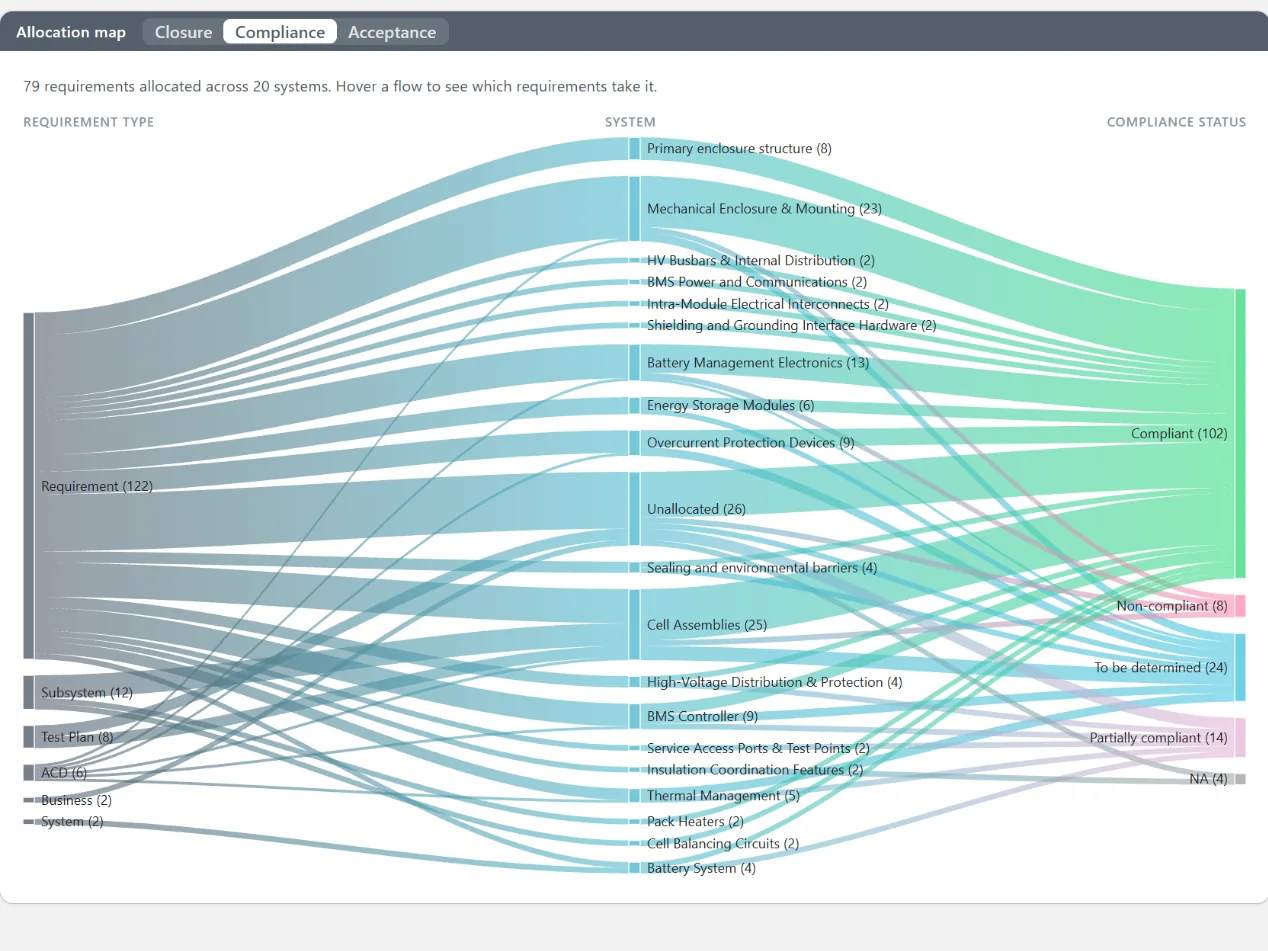
Because every requirement is allocated to a system and every system has an owner, compliance can be reported the way a programme is actually organised. The allocation map shows which systems carry which requirement types and how compliant each flow is. Opening a system lists its requirements with their compliance state, acceptance criteria and recorded evidence. Where systems belong to different suppliers, that is a per-supplier compliance report without anyone compiling one.
Reporting across the chain is covered on the supply chain requirements management page.
Evidence and acceptance, recorded where they belong
A compliance figure is only as good as what sits behind it. In Reqi each requirement carries its acceptance criteria and the verification evidence recorded against it, so the dashboard's "compliant" count is backed by a document, a test or an inspection on every requirement it counts. Assumptions, constraints and dependencies are reported alongside, each with a risk level and an action plan, so a review sees the risk that sits behind a green number.
Every requirement also carries a comment thread, and each user has an inbox of the open comments addressed to them, so the follow-ups from a review land on the requirement and are closed there rather than in email.
Ask your own AI assistant MCP
Reqi's Model Context Protocol (MCP) server makes your requirements management project a live data source for Claude, Microsoft Copilot, ChatGPT and any MCP-compatible systems engineering tool. Ask about verification status, allocation or what changed since the last review, and get the answer from your current requirements baseline rather than from a report somebody exported last month. It is enabled per organisation on request. The technical write-up is on AI and MCP in systems engineering.
Three of the eleven safety requirements allocated to the Door Control Unit have no verification evidence:
- REQ-214 Obstacle detection shall stop door closure within 150 ms
- REQ-231 Emergency release shall operate with power lost
- REQ-240 Door status shall be reported to the train control system
The other eight are verified. REQ-231 is marked Review by the supplier, awaiting acceptance.
Export and print
The register, the needs register and the acceptance records export to Excel, and the views print, so a regulator or a client who wants a document gets one that was generated from the live data at the moment it was asked for. Requirements come in the same way, from Excel, CSV, Word and, via REX, PDF.
What it costs
$190 per month, plus GST
Per project, for one to five projects. Unlimited users on every plan.
A single project is free for three months, up to 500 requirements, with unlimited users and no card. Full detail on the pricing page.
Compliance reporting: frequently asked questions
What states does Reqi report?
Closure, agreement, compliance and acceptance, each broken down across the register and per system. Compliance is reported as compliant, partially compliant, non-compliant or to be determined.
Can I report per supplier?
Yes, by system. Each system has an owner and its own requirements and compliance state, so where a supplier owns a set of systems, their compliance is reported as a group.
Can I export a compliance report?
Yes. The register and the acceptance records export to Excel, and the dashboard views print.
Can my AI assistant read the project?
Yes, through Reqi's MCP server, enabled per organisation on request. Claude, Microsoft Copilot, ChatGPT and other MCP-compatible tools can then answer questions from your current baseline.
See your own numbers
Three months free, 500 requirements, unlimited users, no card. Import a specification and the dashboard fills itself.
Get started free Book a demo