A product specification is not one document. It is a chain: who the product is for, what they need, what the system shall do to meet those needs, which part of the system does it, how you will prove it, and the evidence that you did. Most projects write each link in a different tool, by a different person, months apart. The chain breaks, and nobody notices until handover.
Reqi builds the whole chain in one place, and AI drafts every link of it. You describe the system of interest and point it at your source documents. The AI produces the stakeholder map, the needs, the requirements, the system breakdown, the acceptance criteria and the first pass at verifying the evidence. Engineers review, correct and approve at each stage. This article walks through the six stages and the systems engineering framework each one follows.
Why a spec has to be built as a chain
The V-model puts it simply. On the way down the left arm you define needs, requirements and architecture. On the way up the right arm you verify each level against the one opposite it. A specification is only useful if every requirement can be followed down to the part that delivers it and back up to the stakeholder who asked for it.
Generic AI writing tools produce a document. That is the wrong output. A document has no links in it, so an AI-written spec in Word is just a faster way to make the same untraceable mess. What you want from AI is structured records: each need, requirement, system and acceptance criterion as its own item, linked to the items it came from. That is how Reqi uses it.
| Stage | What the AI drafts | Framework it follows |
|---|---|---|
| 1. Stakeholders and needs | Stakeholders by class and ring, 1–5 needs each, MoSCoW priority, source | INCOSE stakeholder needs analysis, MoSCoW |
| 2. Requirements | Business, system, subsystem and component requirements with rationale, criticality and verification method | INCOSE SE Handbook requirements definition (§4.2, §4.4) |
| 3. Architecture | Functional or physical breakdown up to four levels, then allocation of each requirement | INCOSE system of interest, 100% rule, architecture definition |
| 4. Acceptance | Acceptance criteria per lifecycle phase, verification method, proposed deliverable | SMART criteria; review, analysis, modelling, simulation, demonstration, inspection, test |
| 5. Verification | Compliance status and justification for each requirement, citing pages in the submitted evidence | Requirements verification and compliance matrix (RVTM) |
| 6. Traceability | Links between needs, requirement levels, systems, verification plans and evidence | Bidirectional traceability |
1. Stakeholder map and needs analysis
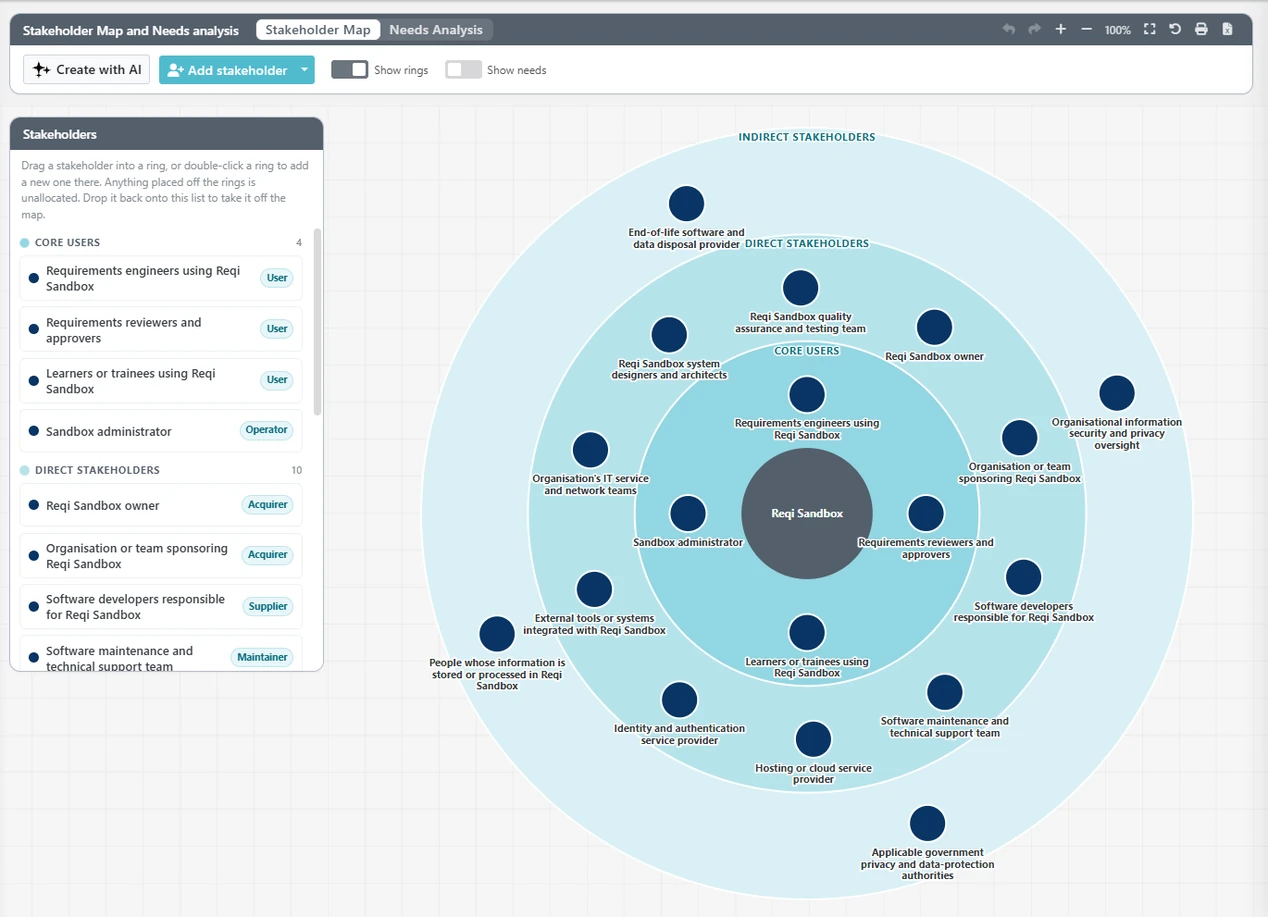
Every spec starts with the question of who it is for. Reqi's Stakeholder & Needs Analysis page has two views: a stakeholder map and a needs table.
The stakeholder map is an onion. Stakeholders sit in concentric rings, by default core users at the centre, then direct stakeholders, then indirect stakeholders. Each stakeholder also has a class that covers the whole lifecycle, not just the people who will use the product: acquirer, operator, maintainer, user, supplier, regulator, society and environment, and disposer. Forgetting the maintainer or the regulator is one of the most common reasons a spec gets rewritten late, and the classes are there to make the gap visible. You can rename the rings and classes for each project.
The AI builds the first draft. You give it the name and description of the system of interest, how complex the project is, and any knowledge bases to read, such as a concept of operations, a client brief or a standard. It then applies INCOSE stakeholder needs analysis:
- It identifies stakeholders in two passes. The second pass looks specifically for the ones the first missed. A substantial project typically ends up with 12 to 30.
- It places each stakeholder in a class and a ring.
- It writes one to five needs per stakeholder in a fixed form: "Stakeholder needs outcome so that reason". Needs describe outcomes, not solutions, so they do not lock in a design before the requirements are written.
- It records the source of each need: the document it came from, or "Inferred" when the AI reasoned it out. Inferred needs are the ones to check first.
Every need gets a MoSCoW priority: Must, Should, Could or Won't. The AI aims for roughly a quarter Must, half Should and a quarter Could, and rebalances if too many needs come back as Must, because a spec where everything is mandatory gives the design team nothing to trade. Won't means "agreed out of scope for this phase" and is always set by a person, never by the AI. The needs can be exported to Excel or printed grouped by priority for a stakeholder workshop.
For the method behind this stage, see transforming stakeholder needs into requirements.
2. Requirements derived from each need
Needs are in the stakeholders' language. Requirements are in the engineers' language: each one a single, verifiable "shall" statement. Reqi's requirements management has two AI routes to get there, depending on where your requirements come from.
Route one: generate requirements from the needs. The generator follows the requirements definition processes of the INCOSE Systems Engineering Handbook (sections 4.2 and 4.4) and works down a fixed hierarchy:
Stakeholder needs → business requirements → system requirements (L0) → subsystem requirements (L1) → component requirements (L2)
Each requirement comes back with:
- a level (business, system, subsystem, component) and a category such as functional, performance, interface, safety, regulatory, human factors, reliability, maintainability or security
- a criticality carried over from the need it answers: a Must need gives Essential requirements, Should gives Important and Could gives Desirable
- a rationale, the lifecycle phases it applies to, and a verification method of inspection, analysis, demonstration or test
- the ID of the parent requirement it satisfies and the stakeholder need or needs it came from
The generator also tells you what it could not do. It lists any unaddressed needs, needs that no requirement answers, along with the assumptions it made and any warnings. An unaddressed need is either a gap in the spec or a need that should move to Won't, and either way someone has to decide.
Route two: extract requirements from documents you already have. On contract work the requirements usually already exist in a client specification, a standard or a tender. The register's AI reads the indexed documents, and for each section you choose one of three modes:
- Copy: the requirement text is cut straight from the source, word for word, with nothing rephrased. Use it when the wording is contractual.
- Elicit: the AI rewrites the section's content as clean requirements.
- Skip: the section is ignored.
Single requirements can also be redrafted on the spot. The AI rewrites them to INCOSE writing rules (one "shall", one thought, unambiguous, verifiable, no "will", "should" or vague terms) and writes a rationale for each.
Every requirement then moves through a status from draft through candidate and agreed to approved. AI-generated items are flagged as AI-generated, so a reviewer always knows what a person has not yet read.
3. System architecture and breakdown
Requirements need somewhere to live. Reqi's System Breakdown Structure is a diagram of the system of interest and its parts, and the AI can draw the first version from four starting points:
- from the stakeholder needs
- from a specification, using its table of contents for the system types
- by expanding systems you have already drawn
- from pasted text
It works to INCOSE architecture practice. You choose a functional breakdown, what the system has to do, or a physical or product breakdown, what it is made of, up to four levels deep. The functional breakdown applies INCOSE's 100% rule: the children of each element must cover all of their parent's scope, with nothing missing and nothing extra. Anchoring everything to one named system of interest keeps the AI from mixing in neighbouring systems that are not yours to deliver. The background is in what is systems architecture.
Then the AI allocates the requirements. Allocate with AI places each requirement on the lowest-level system able to satisfy it, following INCOSE handbook sections 4.4 and 4.5. When the fit is genuinely ambiguous it does not guess. It leaves the requirement unallocated and flags it for a person to decide. Allocation changes can go through an approval step, so a package owner sees a request before a requirement lands in their scope.
The Ecosystem view then shows the whole network: the system hierarchy, the requirement hierarchy, or which requirements sit on which system, coloured by closure, agreement or compliance. See requirement allocation for why the lowest capable level matters.
4. Acceptance criteria and verification plans for each phase
A requirement is not finished until you know how it will be accepted. On the Allocation & Acceptance page every requirement has an acceptance criterion, a verification method, an acceptance status and a proposed deliverable.
Acceptance is planned phase by phase. The default lifecycle is concept, detailed design, build, test and handover, and each project can replace those with its own phases, such as factory acceptance or site acceptance testing. For a requirement and a phase, the AI drafts:
- an acceptance criterion covering that phase's activities, written so it can be checked later
- a verification method: review, analysis, modelling, simulation, demonstration, inspection or test (projects can set their own list)
- the deliverable that will prove it, as a document type (drawing, specification, certificate, design report, manual, schedule or plan) with a suggested title
- a SMART check of the requirement itself: specific, measurable, attainable, realistic, testable and traceable. If a requirement cannot be given a clean acceptance criterion, the problem is usually the requirement.
Verification plans are linked items, not loose documents. A verification plan, or test plan if your project calls it that, is its own item, linked to the requirements it verifies. The Link Map on each requirement shows those links on a canvas or as a table, so you can see at a glance which requirements have a plan and which do not.
The AI drafts the criteria and names the deliverables. It does not write the full test procedure; that stays with the engineer who will run it.
5. Verifying the delivered work against the requirements
This is where most specifications fail in practice. Design reports, inspection records, as-built drawings, certificates and handover manuals arrive by the hundred, and someone has to check every requirement against them by hand.
Reqi's Compliance page holds, for every requirement and every work package, a compliance statement, the evidence documents attached to it, and a status: compliant, partially compliant, non-compliant, to be determined or not applicable.
The AI does the first read of the evidence. Submitted documents go into a knowledge base, where they are indexed for search. Reqi recognises the document type, including verification and compliance evidence, and drawings in PDF are read by a vision model, so the drawings count as evidence too. Verify Assist then checks a requirement against those documents and returns:
- a proposed compliance status
- a justification for it
- the documents, sections and pages it relied on
Run it on one requirement, or in batch from the register across a whole package. Because every answer cites its pages, the reviewer checks the citation instead of searching the documents from scratch.
The output is the requirements verification and traceability matrix (RVTM), exported to Excel in a standard template with the evidence and compliance status for every phase, or as a custom export with the columns you pick. The dashboard charts compliance by system and package for progress meetings. For the handover end of the lifecycle, see operational readiness, completion and handover.
6. Traceability back to the stakeholder needs
Traceability is what the first five stages add up to, as long as every link was recorded when the item was created rather than reconstructed at the end. In Reqi the chain runs like this:
- Need to requirement: each generated requirement records the stakeholder needs it came from, and the generator reports any need that nothing answers.
- Requirement to requirement: each requirement links to the parent it satisfies, from business level down to component.
- Requirement to system: allocation places each requirement on the system that delivers it.
- Requirement to verification: acceptance criteria per phase, linked verification plans and named deliverables.
- Verification to evidence: compliance status backed by the cited documents.
You can follow it in several views. The requirements diagram shows the derivation hierarchy. The Ecosystem view shows which system each requirement sits on. The Link Map shows the links for one requirement. The dashboard Sankey shows how requirement types flow to systems and then to status. The RVTM export puts the whole matrix in one spreadsheet. Requirements traceability covers the views in more detail, and what is a traceability matrix covers the method.
The practical test is simple. Pick any acceptance result and ask why that requirement exists. If the answer leads back through a system and a parent requirement to a named stakeholder's need, the spec did its job. If it stops at "it was in the old spec", you have found a requirement to challenge.
Where the engineer stays in control
"Automated" does not mean unattended. The AI is fast and thorough at the first draft and at reading large document sets. It is also capable of inventing a plausible need or misreading a drawing. Reqi is built around that:
- AI output arrives as a preview you accept, edit or reject. Nothing is approved automatically.
- Needs are marked "Inferred" when no document supports them, and requirements are flagged as AI-generated.
- Copy mode keeps contractual wording exactly as written.
- Ambiguous allocations are left unallocated for a person to decide.
- Compliance answers cite their pages so they can be checked.
- Out-of-scope decisions (Won't) and approvals are always made by people.
That split is the point. The engineer's time goes into judgement: which needs matter, whether a requirement is right, whether the evidence really proves it. It no longer goes into typing, copying and cross-referencing. Using LLMs to write and review requirements goes further into what to hand the AI and what to keep.
Frequently asked questions
Can AI write a complete product specification?
AI can draft every part of one: stakeholders, needs, requirements, system breakdown, acceptance criteria and a first verification of the evidence. It should not approve any of it. In Reqi the AI produces structured, linked drafts and engineers review and approve each stage.
Which frameworks does Reqi's AI follow?
INCOSE stakeholder needs analysis with MoSCoW prioritisation for needs; the requirements definition processes in the INCOSE Systems Engineering Handbook for requirements; the INCOSE system of interest, functional or physical breakdown and the 100% rule for architecture; and SMART acceptance criteria with standard verification methods for acceptance.
Can it use our existing client specification?
Yes. Index the specification in a knowledge base and extract requirements from it, choosing for each section whether to copy the text word for word, have the AI rewrite it as requirements, or skip it.
How does it check evidence against the requirements?
Submitted documents, including PDF drawings, are indexed. Verify Assist checks each requirement against them and proposes a compliance status with a justification and the documents and pages it relied on. A reviewer confirms or changes the status, and the results export as an RVTM in Excel.
Related guides
- Transforming stakeholder needs into requirements: the method behind stages 1 and 2
- What is systems architecture: breakdowns and the system of interest
- Verification and validation: proving the system meets the spec
- What is a traceability matrix: the RVTM explained