

Configuration Management Explained: Process, Roles & Real-World Examples
On 1 August 2012, a trading firm called Knight Capital switched on a piece of software at 9:30 a.m. and started losing money. Not slowly. The system fired off millions of unintended stock orders into the live market, and by the time anyone could pull the plug, about 45 minutes had passed and roughly $440 million was gone. Do the arithmetic and that’s around ten million dollars a minute — close to $160,000 every second — evaporating because of one server that didn’t get the memo.
Here’s the kicker: nobody wrote malicious code. No genius hacker broke in. A new release was deployed to eight servers, it landed cleanly on seven, and the eighth quietly kept running an old version. That’s it. That mismatch — that one stale machine nobody was tracking — is exactly the kind of thing configuration management exists to catch. So let’s talk about what it is, why skipping it gets expensive, and who actually does the work.
The Five Activities of Configuration Management
| Activity | What it does |
|---|---|
| Identification | Define and label the items under control and their baselines |
| Control | Manage changes to those items through a formal process |
| Status accounting | Record and report the state of each item and its changes |
| Audit | Verify the product matches its configuration records |
| Documentation | Maintain the baseline record every other activity is measured against |
What Is Configuration Management?
Strip away the jargon and configuration management is the practice of always knowing exactly what your system is made of — and never letting it change behind your back. It’s two jobs in one. It’s the system’s memory: a faithful record of every approved version and every change that got it there. And it’s the system’s air-traffic control: nothing lands without being checked, logged and cleared first.
The thing it keeps track of is the configuration item (CI) — any piece worth controlling on its own. A block of software code is a CI. So is a hardware unit, a design document, or a whole subsystem. Wrap honest record-keeping around all of them and you earn the one thing every engineer secretly wants: a single source of truth. At any moment you can answer the question that sank Knight Capital — “what is this system supposed to be right now, and how did it get here?”
Why Configuration Management Matters (and What Happens Without It)
When configuration management works, you never hear about it. That’s the trap — it looks like overhead right up until the day it isn’t. What you’re actually buying is insurance against a slow, silent killer called configuration drift: the gap between what your documentation says the system is and what it has quietly become. Skip CM and you don’t avoid change. You just stop being able to see it.
And drift has a body count. Take NASA’s Mars Climate Orbiter in 1999. One team’s software produced thruster figures in pound-force seconds; the navigation software expected newton-seconds. Nobody reconciled the two. The snag is that a pound-force is about 4.45 newtons — so every thruster calculation was off by a factor of 4.45. That sounds small until you point a spacecraft with it. The orbiter dipped roughly 100 kilometres too deep into the Martian atmosphere and tore itself apart. A $125 million mission, lost to a units mismatch nobody was tracking as a controlled item.
Or take 4 October 2021, when a single faulty configuration change to Meta’s backbone routers knocked Facebook, Instagram and WhatsApp off the internet for around six hours — for billions of people at once. One bad config, pushed without anything catching it in time. The pattern is always the same: it’s never the change you reviewed that gets you. It’s the one you didn’t know you’d made.
So here’s the payoff of getting it right. Good configuration management hands you five things:
- Traceability — a clean thread from every requirement to the design, build and test that satisfy it.
- Repeatability — you can rebuild a known-good version on demand instead of praying it still works.
- Safe change — every proposed change gets weighed for cost, schedule, risk and performance before it goes live, not after.
- Accountability — a full history of who changed what and why, which is pure gold during an audit or a 3 a.m. incident.
- Fewer nasty surprises — the documentation and the real system stay in sync, so the map matches the territory.
The Configuration Management Process: 5 Core Activities
Almost every configuration management framework — NASA’s, ITIL’s, the one your DevOps team reinvented last year — comes down to the same five activities. The neat part is how they chain together: each one solves a problem the last one created. Walk through them in order and the whole thing clicks.
Configuration Identification
You can’t control what you can’t name. So step one is deciding what you’re going to manage: you pick your configuration items, give them clear names and version labels, and write down the rules for how each gets changed. Skip this and “the system” stays a fuzzy blob — and you’ll spend month six arguing about whether a config file even counts. Pin the items down now and everything downstream has something solid to grab onto. Which raises the obvious next question: once you know what your items are, how do you stop them changing willy-nilly?
Configuration Control
This is the gate. Once your CIs exist, every request to change one gets reviewed instead of waved through. A Change Control Board (CCB) — usually stakeholders, designers and engineers — looks at each proposed change and asks what it’ll do to performance, schedule, cost and risk before saying yes, no, or not yet. That’s the whole difference between “someone changed it” and “we decided to change it.” Knight Capital’s missing ingredient lived right here. But a gate only logs the decisions you make at the gate — so how do you know the current state of everything at any given moment?
Configuration Status Accounting
Status accounting is the running logbook. It records the state of every CI at any point in time — current version, pending changes, approved baselines — so anyone can trace how an item got from A to today. That built-in traceability is what lets a team spot a small drift while it’s still small, instead of discovering it as a headline. The logbook only helps, though, if it’s telling the truth. So how do you prove the records actually match reality?
Configuration Verification and Audit
Trust, but verify — then verify again. Audits hold the system’s actual configuration up against its documented configuration and hunt for the gaps: the spec says one thing, the physical item does another, and nobody noticed. Functional and physical configuration audits are the reality check that keeps the logbook honest. Mars Climate Orbiter is what happens when this step never reconciles two teams’ numbers. Catch the mismatch on the ground and it’s a meeting; miss it and it’s a crater. And once everything checks out, you need somewhere durable to write it all down.
Configuration Documentation
Underneath all four sits the documentation — the baseline that every other activity points back to. Design specs, operation manuals, test procedures, performance metrics: this is the source of truth that makes “compare actual against documented” a meaningful sentence instead of a shrug. Without it, the other four steps are just opinions. With it, every change has a fixed reference point to be measured against. Five activities, one loop — and notice none of them run themselves. Which brings us to the people.
Who’s Who: The Roles Behind Change and Configuration Management
Configuration management is a team sport. One person raises a change; getting it assessed, approved and safely shipped pulls in a whole cast. On a two-person project, one of you wears most of these hats before lunch. On a billion-dollar programme, each hat is somebody’s entire career. Either way, here’s the line-up — and if you want the wider org chart, here’s our guide to the roles in systems engineering.
- Configuration Manager — owns the CM plan, decides what counts as a CI, and keeps the source of truth trustworthy. The librarian-in-chief, and the person who sleeps fine the night of a big release.
- Change Manager — runs the change process end to end: logging requests, herding the assessments, scheduling approved changes so two of them don’t crash into each other.
- Change Control Board (CCB) — the group that approves, defers or rejects changes. Its superpower is having engineering, project, quality and operations all in the room, so a change gets judged from every angle at once.
- Change Requestor / Submitter — anyone who raises a request, from an engineer spotting a bug to a customer wanting a feature. The spark that starts the whole machine.
- Requirements Manager — keeps the requirements baseline current and makes sure every change still traces back to what the system is actually supposed to do.
- Project Manager — guards cost, schedule and scope, usually sits on (or chairs) the CCB, and translates between the delivery team and the stakeholders.
- Systems / Design Engineers — do the impact assessment: “if we change this, what else moves?” They turn a hopeful request into an informed decision.
- Quality Assurance (QA) Manager — makes sure the process is actually followed and runs the audits that keep everyone honest, including the people who’d rather not be.
- Verification & Validation (V&V) Lead — confirms the changed system still meets its requirements and still does the right job, typically through the systems engineering V-model.
- Release / Build Manager — packages approved changes and gets them onto the right machines, cleanly, every time. This is precisely the role Knight Capital needed watching the eighth server.
- Safety / Assurance Manager — on safety-critical systems, signs off that a change won’t add unacceptable risk before it goes anywhere near production. The person allowed to say “no” loudest.
- Configuration Auditor — independently checks that the as-built system matches the as-documented baseline, through functional and physical configuration audits.
- Stakeholders / Sponsor — fund the work and hold final authority on the big, expensive calls. When a change is genuinely contentious, this is where the buck stops.
Configuration Management Best Practices
Strong configuration management isn’t heroics. It’s a few dull habits done relentlessly:
- Delegate roles clearly so everyone knows what they own — the “I thought you had it” gap is where eighth servers live.
- Communicate and train regularly, so the process gets used instead of quietly routed around by people in a hurry.
- Automate the boring parts with version control and CM tooling — Git, Ansible, Puppet, a CMDB — so the source of truth updates itself instead of relying on someone’s memory at 5 p.m. on a Friday.
- Audit on a schedule, not just after something explodes, so drift gets caught while it’s cheap.
- Write change records a stranger could read — a one-line “fixed stuff” commit helps absolutely nobody during an outage.
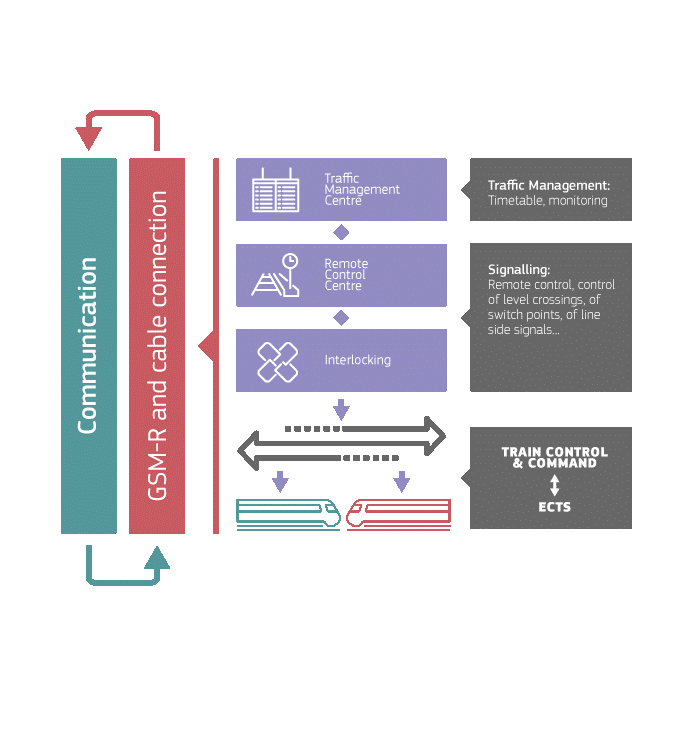
Case Study: European Railways Traffic Management System
Now for what good configuration management looks like at terrifying scale. The European Rail Traffic Management System (ERTMS) is the project of making trains from dozens of countries run on one shared signalling and control standard — so a train can cross a border without stopping to swap brains. The catch is that every country shows up with its own rules, its own legacy kit and its own idea of “normal.”
The Challenge
On paper this is a configuration manager’s nightmare: differing operational procedures, clashing national standards, and a mountain of unique configuration items that all need updating for local conditions — without any one tweak quietly breaking the cross-border interoperability that’s the entire point.
The Solution
So ERTMS did exactly what the five activities prescribe, just supersized. A Europe-wide configuration management board, with a representative from each country, became the single gate for approving, rejecting and changing configuration items. Configuration control tools tracked the avalanche of change requests, and one central status-accounting database meant everyone was reading from the same page instead of twelve different ones — which is how you kill duplication and conflict before it starts.
The Result
Repeated audits then confirmed the documentation matched the system as actually deployed, so discrepancies surfaced in a review rather than on a railway. The result: one coherent system stitched across wildly different national networks. It’s the cleanest proof going that configuration management isn’t paperwork for its own sake — it’s the thing that lets genuinely enormous systems hold together.
More Real-World Configuration Management Examples
ERTMS isn’t a special case. Once you know the shape, you see configuration management everywhere:
- Aerospace and defence — NASA, ESA and the defence primes run formal CM with change boards and baselines on every programme; the NASA Systems Engineering Handbook treats it as table stakes, not a nice-to-have.
- Software and DevOps — every Git repo, Infrastructure-as-Code template and CI/CD pipeline is configuration management wearing a hoodie: versioned, reviewed, reproducible change.
- IT service management — ITIL teams run a Configuration Management Database (CMDB) so that before you touch one server, you can see everything else that leans on it.
- Automotive and medical devices — when a recall hits, CM is what lets a company prove exactly which version of which part went into which unit. Without it, “which cars are affected?” has no answer.
The throughline across all of them is the same one Knight Capital learned the hard way: change is going to happen no matter what you do. Configuration management is just the decision to watch it happen on purpose.
Frequently Asked Questions
What is the purpose of Configuration Management?
Configuration management keeps a system’s integrity and consistency intact across its whole life. It tracks, records and controls changes to configuration items (CIs) so performance stays high, costs stay down, and teams can respond to change fast without losing track of what they’ve actually built.
What happens if you don’t use Configuration Management?
You get configuration drift: the live system quietly wanders away from its documented baseline until nobody’s sure what’s really running. That uncertainty is what turns small changes into outages, failed audits and very expensive incidents — Knight Capital’s $440 million loss in 2012 and Meta’s six-hour 2021 outage both trace straight back to a change that slipped through uncontrolled.
Who is involved in Configuration Management?
Typically a configuration manager (who owns the CM plan), a change manager, the Change Control Board, requirements and project managers, design and systems engineers, QA and V&V leads, release managers, safety/assurance managers and configuration auditors. On a small project one person covers several of these; on a large programme each is a job in its own right.
What roles does the Change Control Board (CCB) perform?
The CCB evaluates, authorises or rejects proposed changes to CIs. Made up of stakeholders, designers and engineers, it weighs each change’s likely impact on performance, cost, schedule and risk — so changes get decided deliberately instead of by whoever happened to hit deploy.
How is Configuration Management different from Change Management?
They overlap but aren’t the same thing. Change management is the process of assessing, approving and coordinating individual changes. Configuration management is the broader discipline of always knowing and controlling the state of every configuration item over time. Put simply: change management governs the decision to change; configuration management makes sure your records of what you have never stop matching reality.
What are the best practices to follow in Configuration Management?
Delegate roles clearly, communicate and train often, automate with version control and CM tooling, and audit on a schedule rather than only after something breaks. Dull, repeated, non-negotiable — that’s what delivers consistent, reproducible results.